LightningBlocks Tutorial
Controls and basics to get moving in the world. New to the game idea? Read About LightningBlocks first.
Controls
| Input | Action |
|---|---|
| W A S D | Move |
| Mouse move | Look |
| Left click | Break |
| Right click | Build / interact / throw |
| Space | Jump |
| E | Toggle inventory |
| L | Toggle wallet |
| O | Toggle options |
| Enter | Open chat / send message or command |
Gathering materials
Gathering works like a typical voxel sandbox: break blocks and collect what drops. Use materials for building and crafting.
Specific resources, tools, and drop rules — coming soon.
Crafting
Crafting turns gathered materials into useful items. Open your inventory with E, then place items in the slots on the left and take the crafted item from the slot on the right.
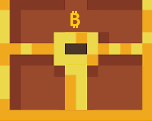
Satoshi chest
Eight 1 sat coins around an empty center craft a Satoshi chest.

10 sat block
Put a 10 sat stack in the top-left slot and leave the rest empty to craft a 10 sat block.

10.000 sat block
Put a 10.000 sat stack in the top-right slot and leave the rest empty to craft a 10.000 sat block.

Chat and commands
Press Enter to open chat. Type plain text with no prefix and everyone on the server sees it.
Who hears you
| Type this | Who sees it |
|---|---|
| Just your message | Everyone on the server |
/global <msg> | Everyone on the server |
/local <msg> | Only players near you, within the same range you can see other players |
/msg <player_name> <msg> | Only that player — a private message |
/r <msg> | Only the last player you messaged |
Use /local when you only want the people around you to hear it —
nobody further away gets the message.
Player commands
| Command | What it does |
|---|---|
/pay <invoice> |
Pay a Lightning invoice (lnbc…) |
/pay <receiver> <amount> |
Send sats to a Lightning address or another player |
/rain <amount> |
Rain sats on the ground nearby from your balance for others to pick up. Anything nobody claims comes back to you later. |
/time hh:mm |
Creates a Lightning invoice — pay it and the world time changes for everyone |
You can also interact by throwing or giving items so other players can pick them up.
Lightning wallet ingame
Press L to toggle the wallet view. When an invoice appears, pay it with any Lightning wallet (or your account wallet if you set one up). You can pay per invoice or use ingame or LNBits balance — How you pay explains the options.
You can play without an account; create an Account if you want to save progress and attach a wallet.
Tips
Tips is the Lightning interaction page: /tips. Pay invoices there to affect the live world — for example sky billboards, tipping players, changing daytime, or sending a global message.
Open Tips in a browser tab while the game runs if you want to trigger those actions yourself, or share the link so others can.
Account and saving progress
Without an account you can still play, but progress is not saved. If you close the browser window, guest sats and guest progress can be lost. An account stores player info and can include a Lightning wallet for faster payments.